
diados
Extension of the Day

diados

5.0 FREE
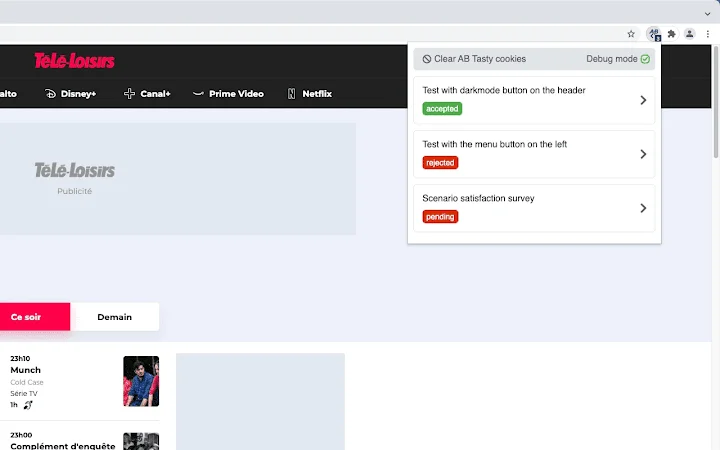
  • Screenshot 1

Description

Browser extension that simplifies the debugging of A/B tests from AB Tasty and adds useful informations.Display A/B tests available on the current page and debug targeting information. For example, if a test does not display, the extension displays invalid targets.Features:- Dark mode compatible (user preference media feature).- Displays a badge with the number of A / B tests found on the current page.- Displays a list of all A/B tests available on the current page with their status.- The list of A/B tests is sorted to show the accepted tests at the top of the list.- Displays a detail view of each tests with their general informations (ID, name, ajax targeting).- Displays a link to edit the test on the AB Tasty editor.- List all targeting informations of the test (URL, code, selector, cookie, IP) with their status.- The list of targeting is sorted to show the invalid targets at the top of the list.- Collapse/expand all targeting informations.

Guides & Tutorials for AB Tasty Debugger Extension for Chrome

How to install AB Tasty Debugger Extension for Chrome
  1. Click the Preview / Download button above.
  2. Once redirected, accept the terms and click Install.
  3. Wait for the AB Tasty Debugger Extension for Chrome download to finish on your device.
How to use AB Tasty Debugger Extension for Chrome

This software is primarily used for its core features described above. Open the app after installation to explore its capabilities.

User Reviews for AB Tasty Debugger Extension for Chrome 0

    No reviews found

Similar Apps


